


4.6.2026
Michael Penning
 Share this
Why is my simple Segment showing me values I don't want to see?
Ever had that happen? Picture the scene: You've worked with Adobe's Analysis Workspace for years, consider yourself a pretty experienced user, and have faced and solved more than a few riddles and moments of confusion in the tool in your time. And then something happens while you're doing an analysis that you've done hundreds of times before, and you just think: "Huh? Is this another of Adobe's practical jokes?"—That does seem to happen; three words: Classification Sets emails…
It happened to me again recently. In hindsight, I'm still not really all that sure if I just automatically did everything right the last hundred times without really thinking about it (it's not exactly rocket science!), or whether I've just wilfully ignored the issue until now. I'm going to go ahead and assume that it's the former.
The problem: Analyzing main product categories in Adobe Analytics
For context: One of our e-commerce clients noticed the following problem. They have five main product categories that are NOT captured in Adobe Analytics.
But we want to analyze them.
These main product categories are each split into many different product sub-categories.
These, meanwhile, are captured in Adobe Analytics.
Because their respective SubCategory IDs are, thankfully, also captured, we're able to cluster the main categories as follows: If SubCategory starts with "11", that means it's "Main category 1", and SubCategory IDs starting with "12" would belong to Main category 2. And so on and so on. So far, so good.
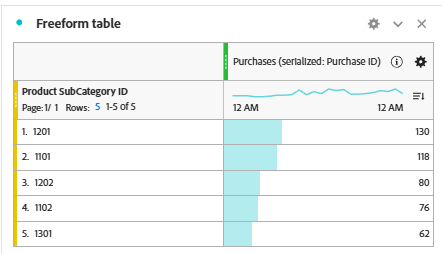
Dimension filter in Analysis Workspace: At first, everything looks correct
The client went ahead and tested this with the dimension filter in the freeform table, and voilà, everything looks good. The filter rule "SubCategoryID starts with 11" shows him all the rows of SubCategories that fall under Main category 1.
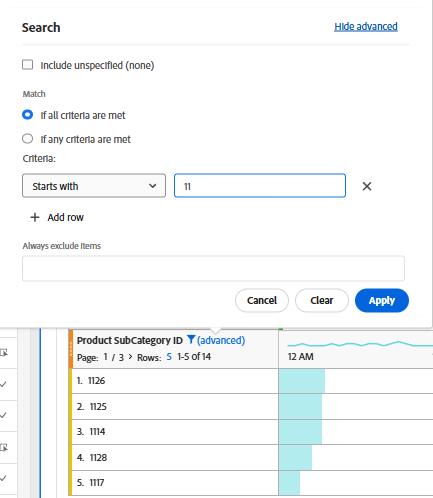
Great, he thinks to himself. So that I can use this as a flexible segment for further analyses, I'll just build a segment like this for all my main categories, and I'll be good to go. Dropdown filter, here we go. I came, I saw, I conquered crashed.
Segment instead of dimension filter: Suddenly, unexpected values appear
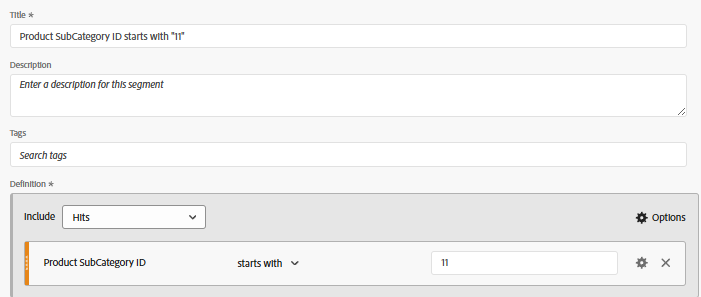
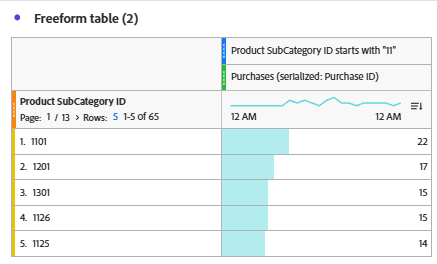
Here's what happened: As soon as the segment replaced the dimension filter, it suddenly stopped showing only the rows of all SubCategories starting with "11" — instead, for all sorts of metrics, rows of SubCategories starting with, say, "12", "13", etc. showed up too. So there we were, thinking "Eh?!"
In our defense—for those of you who knew exactly what was going on from the very first sentence—it didn't take us thaaat long to crack the riddle; we just weren't quite as quick as you!
First round of troubleshooting: is it the segment?
The first thing we looked at was the segment. Did we do something wrong?
The usual check: Hit-based, Visit-based, Unique Visitor-based.
Nope, all fine.
Second, we just blamed Adobe. It's easy and convenient, and sometimes it's even justified.
The cause: it's a Merchandising eVar
Thirdly, though, we finally took a look at the dimension and figured it out fairly quickly: Hang on a second! This is a Merchandising eVar!
Straight away, images popped into my head of a server call listing several different products in the s.products eVar. Within s.products, each individual product gets several Merchandising eVars assigned to it, each with different values. Aha! That could be it.
I took a quick lap around the think tank of my FELD M colleagues, fired off a Slack message to analytics guru Lukas Oldenburg (thanks for the speedy reply <3), and consulted the Adobe forum, where Adobe Analytics Champions had discussed very similar problems, and hey presto, we had it solved.
So what happened? Here's the deal:
-
A customer lands on the shop website and has a look around. They spot something nice and shiny and click on it. → ProductDetailPageView for Product 1 in main product category 1. Check, no problem. The segment's behaving itself.
-
The customer thinks "gotta have it" and adds Product 1 to the cart. → AddToCart event for Product 1. Check, the segment's still behaving.
-
The customer is tempted by that inviting "Continue shopping" button and thinks: "Eh, live a little."
-
The customer spots something else snazzy and clicks on Product 2. → ProductDetailPageView for Product 2 in main product category 2. Check, still fine — as long as our segment is Hit-based!
-
The customer adds Product 2 to the cart. → AddToCart event for Product 2. Check. All's still right with the world, and it keeps on turning.
-
The customer shows some willpower this time, ignores that inviting "Continue shopping" button, and hits "Go to cart" instead. It opens — and fate takes its course.
-
The cart page opens. → CartView event for Product 1 AND, AT THE VERY SAME TIME, IN THE VERY SAME HIT, valid for Product 2. My segment lets me down, shamefully. And the same goes for every other hit/event throughout the rest of the checkout process, right up to the eventual purchase of both products.
Why Hit-based segments aren't clean enough here
Our problem here has two sides. On the one hand, I can't (for now*) segment at the "sub-hit" level of an individual product within a single hit. In Adobe Analytics segments, the hit is simply the lowest level of analysis.
That means if I include all hits in which Product 1 — and therefore main product category 1 — appears, I potentially include more than I bargained for, because Product 2 (and therefore main product category 2) might be set in the very same hit.
On the other hand, I might get the bright idea to exclude all hits containing a product other than Product 1. Annoyingly, though, that also knocks out all the Product 1s that happened to sit in those very same excluded hits.
The exact same problem would crop up with List Variables, too, by the way!
*Note: at the Las Vegas Summit, Adobe announced "Sub-Hit Segmentation" as a new feature. I don't yet know exactly what it'll look like, but I'm definitely curious!
Psst: more on that soon in our Adobe newsletter!
And what about that brilliant solution I promised you? Luckily, I never actually did promise one — because this isn't all that perfectly solvable. For the moment, all I can show you is the next-best route I know of:
-
We create a classification called "Product Main Categories" for the Product SubCategory ID eVar.
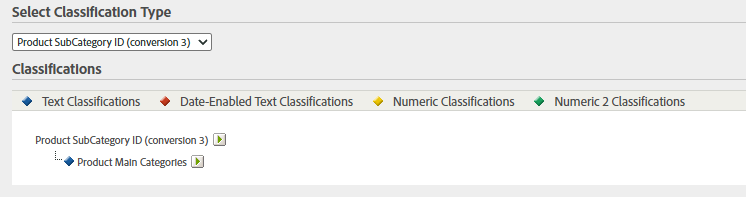
2. Using Classification Rules, we assign the SubCategory IDs to their respective Main Category Values. For now, this still happens in the classic Classification Rule Builder — or, by 28 February 2027 at the latest, in the new Classification Sets Rule Builder.

Our top tip: Deepen your understanding of Classification Sets in Adobe Analytics
If you want to dig deeper: We have an on-demand video where my FELD M colleague Eliot Jones explains how Classification Sets work and how to put them to good use in your Adobe Analytics setups.
In the 25-minute video, you'll learn:
- How Classification Sets work,
- How they differ from the old classification system
- And how to set up your classifications so they stay maintainable and analyzable in the long run.
Watch it on demand now: Demystifying Classification Sets in Adobe Analytics
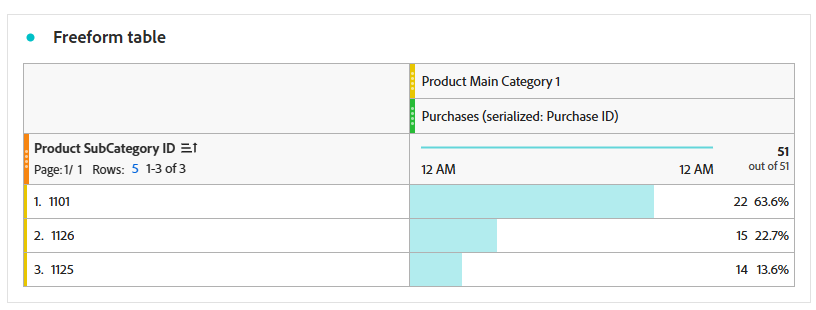
3. The resulting Main Category Values can then be used in Workspace just as usual, as a filter in the freeform table: either directly as a Dimension Value, as a filter within the classification, or by dragging them straight above or below the respective metrics. It's not always super pretty or convenient, but it's a workable compromise at least.
Conclusion: A simple segment isn't always so simple
As I said, this topic isn't exactly rocket science. Many of us will get these kinds of analyses right automatically, or at least catch on quickly after a quick sanity check of the data on display.
At the same time, I'm convinced it doesn't hurt to draw a little more active attention to it, because finding your way around the sometimes complex Adobe Analytics universe hasn't quite become second nature for all of us just yet.
I'm also convinced that we sometimes run into this issue without even noticing. What if we'd simply built a segment and not noticed that something was off? The unintentionally segmented data might be tucked away near the bottom of the table, out of sight. Who knows whether we wouldn't have just ignored it.
And most of the time, it won't be the end of the world. Still, it's always nice to solve another analytics riddle and know your analysis is that little bit cleaner.