


11.12.2025
Sandy Bekheet, Marvin Geisler
 Share this
Please note: This article was first published in 2023 and was last updated on December 11, 2025.
Looker and Looker Studio (Pro), formerly known as Google Data Studio, are two widely used business intelligence tools of the Google cosmos that help you create interactive dashboards and reports. Both tools have their individual strengths and are designed for different use cases and target groups.
In this article, we explore the features of each tool and highlight their differences by describing typical use cases where they are best suited.
We'll also highlight the most significant advantages and disadvantages of the tools. At the end of this article, you will find a downloadable PDF file, summing up this comparison of Google’s BI tools.
1. Looker – The Ferrari among Business Intelligence Tools?
Looker is the flagship BI platform within Google Cloud. It goes beyond simple visualization, serving as a comprehensive tool for data modeling and governance.
Its primary strength is the LookML semantic layer, a feature that ensures every critical business metric is defined just once and applied consistently across all reports and analyses in the entire organization. This consistent foundation of trusted data is essential for scaling analytics efficiently and successfully implementing genuine self-service capabilities for all users.
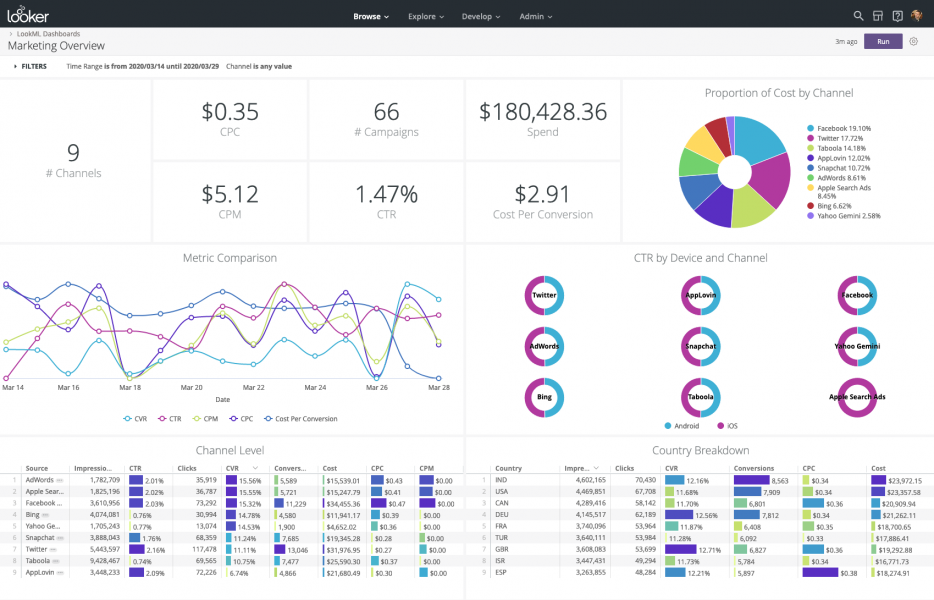
Example Looker Dashboard
Use case 1: Regain trust in the data and introduce self-service analytics in a scale-up
Scenario: A data-driven scale-up found their data team had become a significant bottleneck. Each new analysis request or dashboard meant that a data analyst had to manually write and execute custom SQL queries. Compounding this problem, the company observed frequent inconsistencies in key metrics across different reports, leading to diminishing trust in the underlying data.
The fast-growing firm needed a solution that would enable a true self-service analytics approach, one that provides trusted data directly to their data-savvy business users without requiring them to learn or write SQL.
Why is Looker a good fit for this use case?
In this example use case, Looker is an ideal tool for tackling the problem of inconsistent metrics and enabling business users to generate insights on their own without requiring any SQL knowledge.
Looker is a data platform that allows companies to connect to their data warehouse(s), explore their data, and create visualizations and dashboards on top of it.
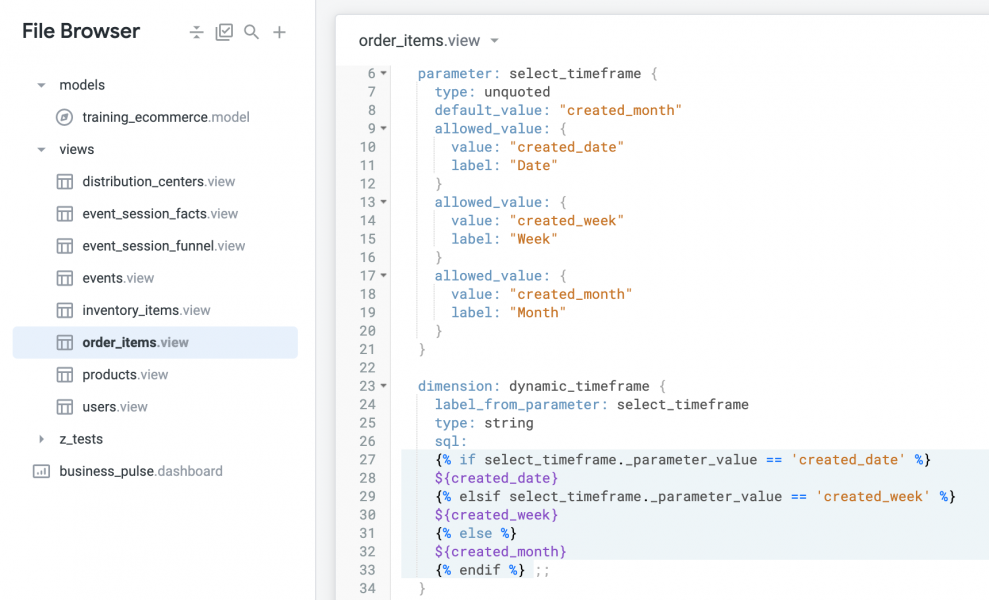
It offers a unique semantic layer using Looker’s own language, LookML, which describes dimensions, aggregates, and data relationships in a way that creates reusable, version-controlled data models. Looker uses these models to automatically generate ad-hoc SQL queries against the database.
The advantage of LookML is that it fosters an environment where data analysts and analytics engineers are encouraged to follow the DRY (“don’t repeat yourself”) software development principle.
This means that you write SQL expressions once, in one place, and Looker’s query engine uses the code repeatedly to generate ad-hoc SQL queries. Business users can then use the results to build complex analyses and dashboards in Looker, focusing only on the content they need, not the complexities of the SQL behind it. By removing the burden of knowing SQL to perform data analysis, the company made a huge leap toward enabling self-service analytics.
The dimensions (e.g., “what is a user?”) and metrics (e.g., “how is MRR defined?”) are defined in one place, meaning they are consistent across all reports, restoring business users' trust in the data.
Use case 2: A major retailer wants to unify data from physical and online stores while establishing governed access for internal and external partners.
A large retail company is looking to gain a comprehensive understanding of its customer base by integrating data from its online store and physical locations. This unified view is crucial for identifying new growth areas. Furthermore, the company has two specific data delivery requirements:
1. Internal governance: Provide personalized performance dashboards to store managers, ensuring each manager only accesses data relevant to their specific store (i.e., data security and relevance).
2. External monetization: Embed customized dashboards detailing product performance and buying behavior into their partner platform and charge main partner brands for this valuable analytical access.
Why is Looker a good fit in this case?
Looker is perfectly suited for this scenario due to its enterprise-grade capabilities in data integration, granular security, and white-label embedding. Let's dive in deeper:
1. Unifying data and accelerating modeling
Looker's core strength is its ability to connect to and model data from a variety of modern cloud data warehouses. This enables the retailer to combine disparate online and physical store data into a single, cohesive view for omnichannel analysis.
To drastically cut down on development time, the company can leverage pre-built assets from the Looker Marketplace. For instance, deploying a Retail Analytics Block provides a ready-made LookML model and associated dashboards for key metrics like store performance, customer behavior, and basket analysis.
These blocks serve as best-practice templates, saving hours otherwise spent on initial data modeling and allowing the team to quickly move from database connection to high-value insights.
Looker blocks exist for a variety of data sources and use cases (e.g., Hubspot Marketing, Google Analytics 4, Shopify). But be aware that some blocks only work out of the box when the data is available in a specific structure or optimized for a specific database. You can check out all existing blocks in Looker’s marketplace.
2. Granular access control and governance
Looker’s robust access management features solve the challenge of sharing sensitive data internally:
- Permissions and content access: The company can set up a "Store Manager" user group to efficiently manage the content (folders) and features (actions allowed in Looker) available to all managers.
- Data access filters (row-level security): Crucially, the company can configure data access filters within the LookML model. This technical configuration ensures that when a store manager accesses a dashboard, Looker automatically restricts the data they see to only the rows pertaining to their designated store, enforcing strict security and personalized relevance without needing unique reports for every manager.
3. Secure embedding and revenue generation
To open a new revenue stream, the company can turn its analytical insights into a chargeable product for partner brands.
- Signed embedding (SSO Embed): Looker allows for secure, white-label embedding of dashboards into the partner platform using methods like signed embedding (SSO Embed). This authentication method securely passes user credentials to Looker, ensuring partners can only view the data they've paid for, related to their specific products or regions.
- Custom theming: The ability to apply custom themes ensures that the embedded analytical content seamlessly matches the partner portal's existing design, providing a polished, integrated experience.
Finally, Looker's built-in scheduling and alerting feature further improves operational efficiency, enabling the retailer to automate the delivery of performance reports or instantly notify key personnel (e.g., the operations team) whenever a critical condition, such as a sharp increase in the return rate, is met.
2. Looker Studio – A great fit for smaller companies
Having gained a comprehensive understanding of Looker’s capabilities, use cases, and features, we shall now shift our focus towards Looker Studio, formerly known as Google Data Studio.
Looker Studio stands out as the most accessible and user-friendly platform in the Google BI lineup, with the standard version offered completely free. Its true power lies in the seamless, native integrations it provides with Google products (such as Google Analytics 4, Google Ads, and BigQuery). Looker Studio is actually a surprisingly versatile and often overlooked BI solution, offering multiple useful features, especially considering that it is a completely free tool.
Thanks to its intuitive, drag-and-drop environment, users can effortlessly connect to data sources, build visually impactful reports, and achieve quick time-to-insight, enabling effective self-service analytics across the business.
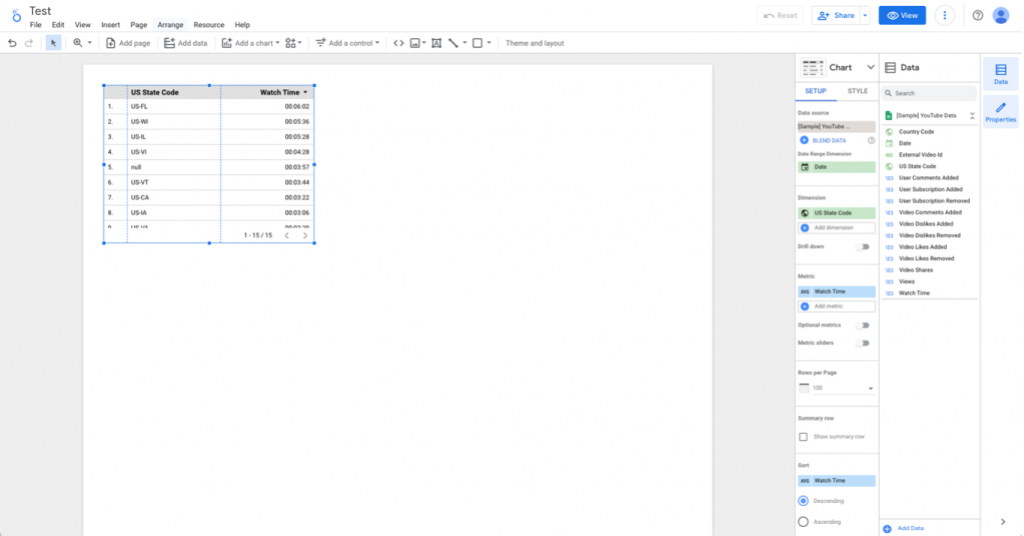
Looker Studio New Report View
Use case 3: A startup wants to create simple, interactive dashboards to track the performance and growth of their product
A startup recently launched its flagship product and needs to immediately track sales and marketing performance to measure channel effectiveness. Lacking significant IT and budget resources, the core requirement is a cost-effective, user-friendly, and rapidly deployable tool that enables non-technical team members to generate interactive, streamlined reports.
Why is Looker Studio a good fit in this case?
Looker Studio is the perfect starting point for this fast-moving company. Its zero-cost barrier to entry and intuitive drag-and-drop interface allow non-technical team members (like marketers or product managers) to bypass complex SQL and immediately connect to essential platforms. This rapid deployment capability means the startup gains valuable insights right away, ensuring agile decision-making without demanding dedicated data engineering support.
Capabilities: speed, integration, and collaboration
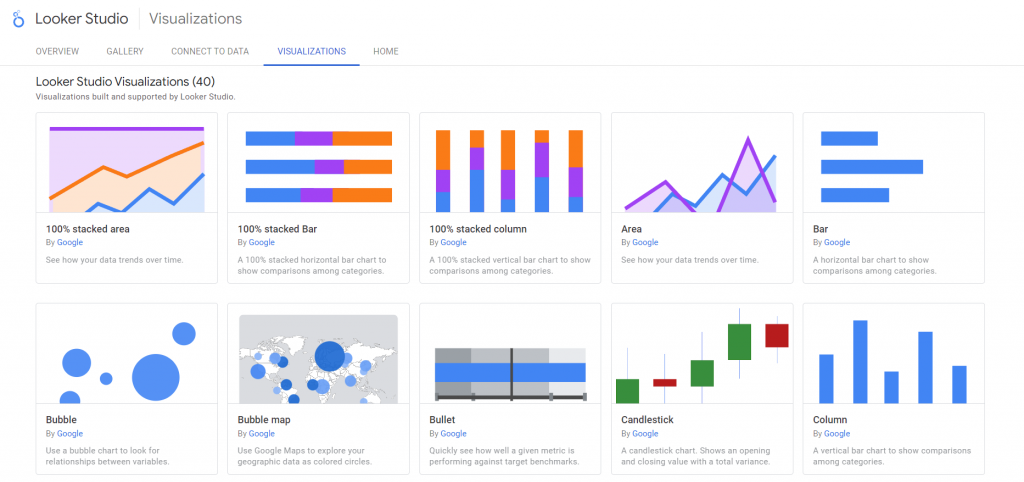
Some of the visualizations Looker Studio offers
- Rapid visualization: The platform provides a wide, continuously evolving variety of charts, from simple metrics to complex visuals. This library is vastly expanded by Community Visualizations, allowing users to share and use custom components, ensuring reports are both engaging and tailored.
- Google ecosystem mastery: As a native Google product, Looker Studio boasts seamless, deep integration with core services like Google Sheets, Google Analytics 4 (GA4), and BigQuery – for all connectors offered you can check here. It also connects easily to popular third-party platforms such as Salesforce and Facebook Ads.
- User efficiency & collaboration: Users can jump-start development using a rich library of report templates covering diverse use cases (marketing, sales, finance). The tool supports real-time collaboration (editing and commenting), versioning, and features like data preview for streamlined teamwork. Reports can be easily shared or embedded in web pages for broad organizational consumption.
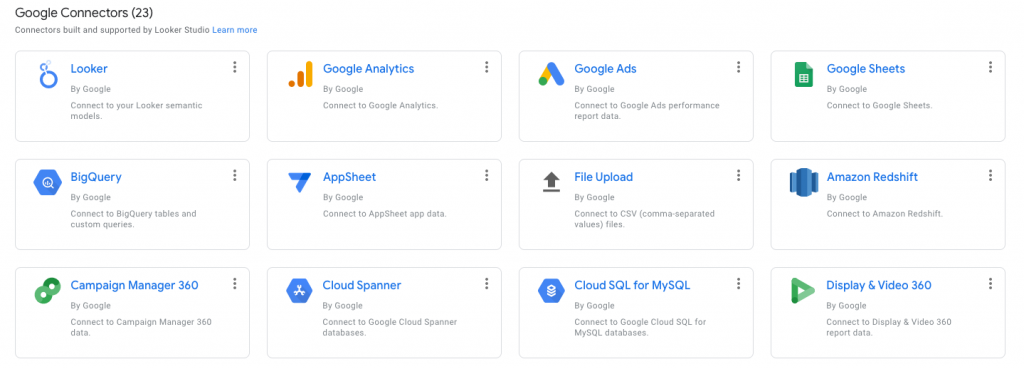
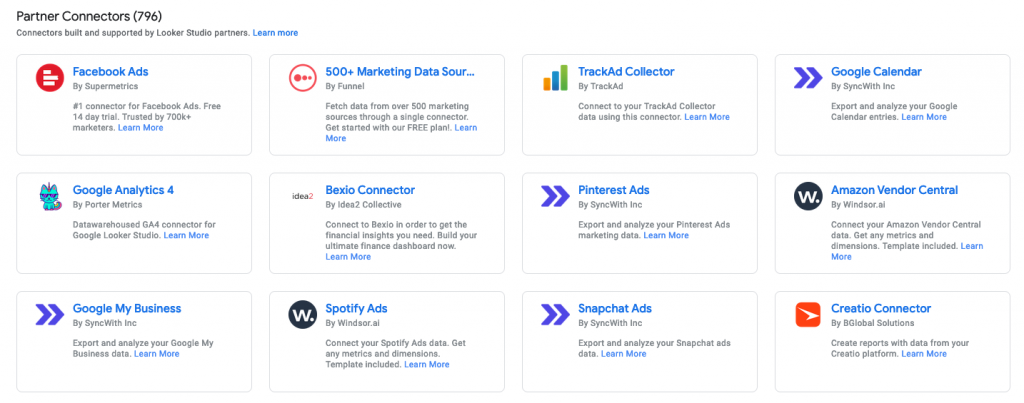
A quick view of the available data source connectors
Important limitations: when to upgrade
While ideal for agile reporting, Looker Studio has limitations that necessitate the use of a data warehouse or an upgrade for larger organizations:
- Performance at scale: The platform can struggle with large or complex datasets, often becoming slow or unresponsive. Its data blending capability is basic and capped at a maximum of five sources, with performance degrading significantly in complex scenarios.
- Limited data modeling: Looker Studio is primarily a visualization tool. It offers only simple data blending and the creation of per-dashboard calculated fields. It fundamentally lacks the robust modeling features needed for complex, reusable data transformations, requiring advanced data pipelines to be built externally (e.g., in BigQuery).
- Basic governance: For organizations requiring strict compliance or granular control, the free version is insufficient. Its permission system is limited to basic roles (Owner, Editor, Viewer) at the report level, lacking the organizational governance and defined workspaces necessary for secure, scalable team management (features addressed by Looker Studio Pro).
3. Looker Studio Pro – The enterprise upgrade
Looker Studio Pro is Google's enterprise-grade offering, built for organizations that have outgrown the basic sharing limitations of the free version. It extends the familiar, user-friendly dashboard experience with powerful features such as Team Workspaces, robust user management permissions, scheduled report delivery, and access to enhanced customer support.
Crucially, in July 2024, the $9-per-use monthly subscription introduced Gemini AI, adding significant new capabilities that redefine accessibility and efficiency in BI workflows.
Use case 4: A mid-sized company that wants to create separate dashboards for each department
A mid-sized company is seeking to create distinct internal dashboards to monitor performance across multiple departments (Sales, Marketing, HR, etc.). To manage security and ensure efficiency, the core requirement is to provide each department with its own secure environment, defining explicit roles and permissions that control who can access, create, view, or edit reports.
Why is Looker Studio Pro a good fit in this case?
Looker Studio Pro is specifically designed to solve organizational and governance challenges at scale.
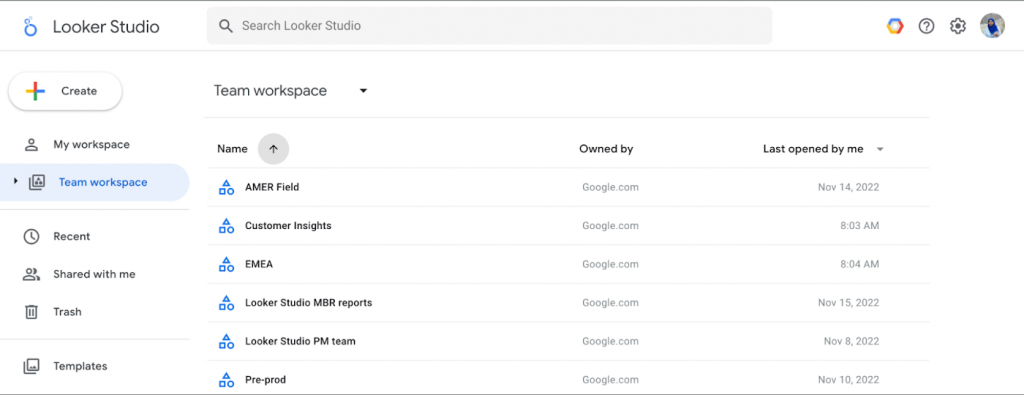
The Team Workspaces feature available in Looker Studio Pro
1. Centralized control and team workspaces
The platform allows the company to establish dedicated team workspaces for each department. Unlike the basic sharing in the free version, Pro enables managers to assign roles (like Manager, Content Manager, or Contributor) to control permissions at the team level, not the individual report level. This makes data organization and security management significantly easier and more efficient across departments. Furthermore, centralized organizational ownership ensures that if a creator leaves the company, reports and data sources remain secure and accessible to the team, eliminating the need for manual ownership transfers.
2. Enterprise security integration (IAM & Dataplex)
Looker Studio Pro integrates directly with Google Cloud Identity & Access Management (IAM). This allows for granular, organization-wide control over who can view or modify assets, ensuring sensitive information is protected and compliance is maintained. Additionally, integration with Dataplex, Google’s data fabric, makes Looker Studio Pro assets visible for better asset management and data lineage tracking, improving transparency and reliability.
Dataplex
Furthermore, granting permissions to view or modify assets within the organization can be accomplished through Identity and Access Management (IAM) in the Google Cloud Platform (GCP).
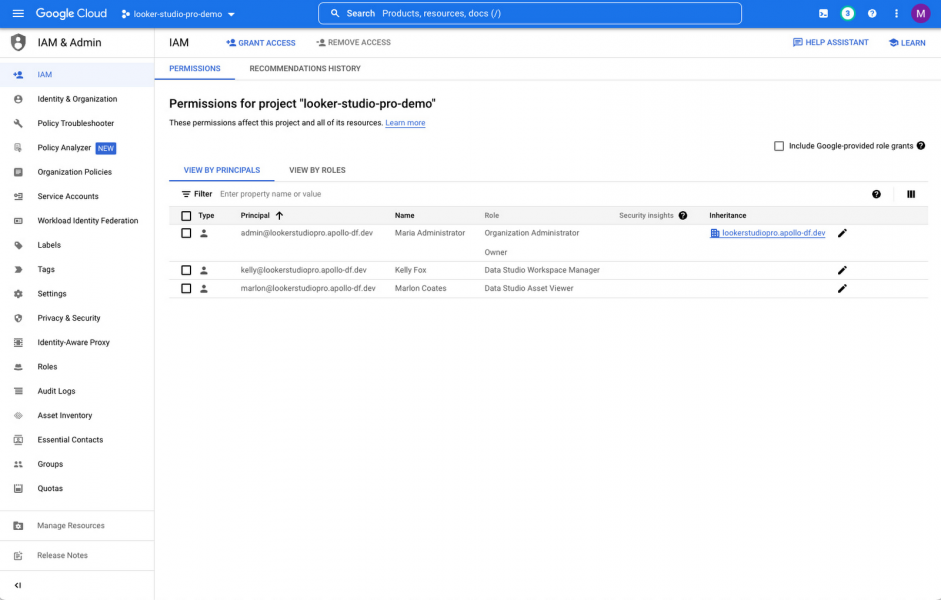
The permissions space of the IAM section in GCP
Dataplex is an intelligent data fabric that empowers organizations to effectively locate, handle, oversee, and regulate their data across various data repositories such as data lakes, data warehouses, and data marts.
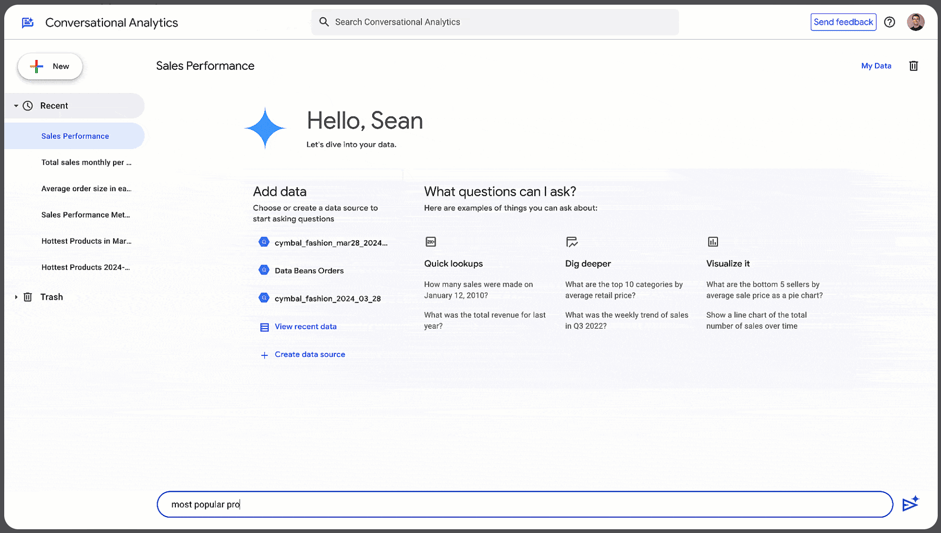
3. Gemini AI: Powering conversational analytics
The integration of Gemini AI democratizes data access. With conversational analytics, users can interact with dashboards by asking questions in plain language, making data exploration accessible even to non-technical teams. Gemini also streamlines reporting by:
- Automatically generating Google Slides presentations from dashboard data.
- Assisting with formula creation in calculated fields.
- Automatically detecting and highlighting trends, outliers, and anomalies in integrated data sources like BigQuery.
4. Advanced automation and mobile access
Looker Studio Pro significantly upgrades workflow automation. Teams can set up automated report delivery via email, Google Chat, or Slack. The limit is increased to 200 scheduled reports per report (up from one in the free version). Alerts can be configured to notify users instantly when KPIs reach specified targets. Finally, optimized mobile dashboards with push notifications and offline access ensure stakeholders can access critical data and respond to alerts efficiently, even on the go.
Limitations of Looker Studio Pro
While Looker Studio Pro successfully addresses user permissions, it still inherits the free version's core limitations in terms of basic data modeling capabilities and potential performance decline when handling complex data at a large scale.
Summary and conclusion
In conclusion, Looker and Looker Studio (Pro) are all powerful data visualization tools, but they are designed for different use cases and targeted towards different customers.
Looker is widely considered to be one of the best BI solutions on the market, despite the existence of other promising tools (like Metabase, ThoughtSpot or Lightdash).
Looker is best suited for companies that have large amounts of data, potentially stored in various databases, and need a tool that can connect to all of them, clean, transform, and integrate data, and create customized visualizations.
It offers a powerful semantic layer for governing reusable metric and entity definitions, version control, scheduling and alerting, embedding into websites and applications, an API, as well as extensive user and access management capabilities. Additionally, it is well integrated into the Google ecosystem, making it compatible with a variety of other Google products (like BigQuery).
However, the cost of using Looker can be high, with monthly expenses reaching thousands of dollars, depending on multiple factors like the number and type of licenses needed and how it is deployed (self-hosted, hosted by Looker, or Google Cloud core hosted). Other smaller downsides we see are limited visualization capabilities compared to Tableau (Looker does allow you to develop your own visualizations using Javascript, but that requires additional development resources). Finally, there is a bit of a learning curve when it comes to LookML.
It is also worth noting that Looker is not meant for one-off analysis or exploratory work on new datasets, because the required dimensions and measures need to be modelled in LookML first. Since its acquisition by Google, integration efforts have increased significantly, notably with the introduction of Looker Modeler in 2023. However, potential downsides remain the high cost of ownership, the steep LookML learning curve for developers, and the fact that its visualization capabilities, while strong, may not be as varied as market competitors like Tableau without custom JavaScript development.
Looker Studio is an excellent option for smaller-sized businesses looking to create simple, interactive dashboards and reports without breaking the bank or requiring extensive IT and data resources. It’s also ideal for individual analysis, one-off visualizations, and reports. Looker Studio can seamlessly handle a single data source or up to 5 data sources with blending, pre-aggregated datasets, spreadsheet data, and CSV files. While Looker Studio offers a vast range of native connectors, some may require an additional fee.
For those seeking greater control over user spaces, permissions, roles, and collaboration also through GCP or experimenting with AI in BI, upgrading to Looker Studio Pro is an excellent option for a modest fee. Plus, with the Google Customer Care program, customers can expect exceptional support. Service-level agreements are also made available for the Pro version, which makes it a good option for enterprises.
As you now know, each tool has its unique strengths and limitations, and selecting the appropriate tool depends on your company’s particular requirements and use cases.
To help you match the strengths and drawbacks of Google’s BI tools with your requirements and evaluate the best-fitting solution for your company, you can find a structured summary of the tool comparison – ready to download – here:
Do you have questions about Looker or Looker Studio (Pro), need support with choosing and implementing the right data architecture for your business or extracting data from your 3rd party tools and production databases into your data warehouse? Feel free to contact us – our experts will be happy to help you with advice, action and their experience!
You can find out more about our analytics & BI services here.
Curious about how Google’s BI Products further develop or any other news, updates and data and analytics best practices? Make sure to subscribe to our newsletter!
Additional resources
Looker
- https://connect.looker.com/library/video/why-use-looker
- https://www.looker.com/
- https://cloud.google.com/looker#all-features
- https://marketplace.looker.com/marketplace/directory
- https://cloud.google.com/looker/docs
Looker Studio
- https://support.google.com/looker-studio/answer/11521624?hl=en#jan-19-2023
- https://cloud.google.com/looker-studio
- https://cloud.google.com/dataplex
- https://lookerstudio.google.com/data