


13.1.2026
Sarah Larbi
 Share this
In this blog post, we'll be comparing three BI powerhouses: Power BI, Looker Studio, and Looker Studio Pro. But instead of just listing the features in a table and leaving you to it, we're diving into three real use cases to help you identify which tool best suits your needs. Let's start with Power BI!
1. Power BI – The enterprise powerhouse
Power BI is Microsoft’s flagship business intelligence platform, designed to connect, model, and visualize data from a wide range of sources.
At its core, Power BI provides a robust semantic layer, advanced data modeling capabilities powered by DAX (Data Analysis Expressions), and seamless integration with Microsoft products, including Excel, Azure, and SQL Server.
These capabilities make it well-suited for organizations that require standardized metrics, strong governance, and secure access to business-critical data.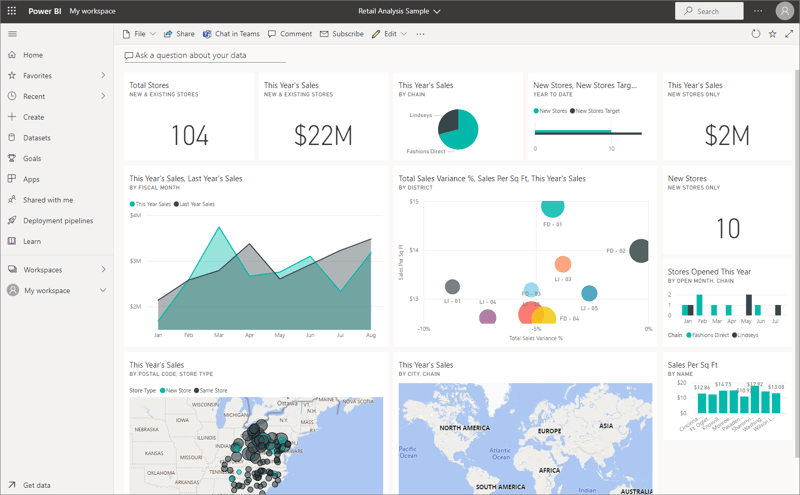
Dashboard example: https://learn.microsoft.com/en-gb/power-bi/create-reports/service-dashboard-tiles
Use case
A large financial services company wants to consolidate data from multiple systems, including ERP, CRM, and accounting platforms, to streamline reporting and gain a unified view of its financial health.
The company needs to automate data consolidation, reduce manual errors, and provide finance, operations, and executive teams with secure access to accurate financial dashboards that can be embedded into internal portals.
Why is PowerBI ideal for this use case?
Power BI’s advanced data modeling capabilities allow the company to create complex calculations, custom metrics, and unified financial statements to be reused consistently across reports.
Row-level security and integration with Azure Active Directory ensure that sensitive financial data is only visible to authorized users. By centralizing business logic within the semantic layer, the organization establishes a single source of truth for key metrics, increasing confidence in reported numbers and supporting regulatory compliance. Power BI's built-in report scheduling and embedded dashboards further streamline access to insights across teams.
SSO query steps: https://learn.microsoft.com/en-gb/power-bi/connect-data/service-gateway-active-directory-sso
PowerQuery
Where PowerBI is limited
Power BI’s self-service approach relies heavily on analysts defining data models (DAX and Power Query) within individual report files, which can lead to inconsistent metrics and the creation of “silos of truth” between different departments if governance is not tightly enforced.
While Power BI Pro is considered affordable for businesses, the platform typically requires an upgrade to the more expensive Fabric tier to access advanced enterprise features such as unlimited sharing with external users, enhanced security, and dedicated cloud capacity for extremely large datasets.
The barrier to entry for non-technical users is also steeper compared to some other BI tools, in terms of the learning curve required, and the interface is not always as intuitive for quick dashboard creation.
Additionally, while Power BI offers robust data modeling and integration, it may struggle with extremely large datasets or highly complex data transformations, requiring additional resources or external tools for optimal performance.
2. Looker Studio – The agile, free visualization layer
Looker Studio (formerly Google Data Studio) is the most accessible and user-friendly platform in the Google BI portfolio, with the standard version offered completely free. Its true power lies in its seamless, native integrations with the entire Google ecosystem, including Google Analytics 4 (GA4), Google Ads, and BigQuery.
Thanks to its intuitive drag-and-drop environment, non-technical users can quickly connect data sources, build visually impactful reports, and achieve rapid time-to-insight.
Use case: Startup agility and quick performance tracking
A newly launched startup needs to start tracking sales and marketing performance immediately to measure channel effectiveness. They have a limited budget and limited IT resources. They need a zero-cost, user-friendly, and rapidly deployable tool that empowers non-technical team members to generate interactive reports without needing SQL knowledge.
Why is Looker Studio the optimal fit?
Looker Studio is the perfect starting line due to its zero-cost barrier to entry. This allows marketers and product managers to immediately connect to essential Google platforms without any need for complex SQL.
Its focus on rapid visualization means the startup gains valuable insights right away, ensuring agile decision-making without any need for dedicated data engineering support.
Core capabilities:
- Google ecosystem mastery: Provides deep, seamless connectivity with core Google products.
- User empowerment: The drag-and-drop interface and rich library of templates enable non-technical users to build reports fast.
- Collaboration: Supports real-time collaboration, versioning, and easy embedding of reports in web pages.
Limitations & scaling:
- Limited data modeling: It offers only basic data blending (capped at five sources) and per-dashboard calculated fields, making complex, reusable data transformations impossible.
- Basic governance: Permissions are limited to basic roles at the report level, lacking the organizational governance and defined workspaces needed for secure, scalable team management.
3. Looker Studio Pro: Governance and AI at scale
Looker Studio Pro is Google's enterprise-grade upgrade, extending the familiar Studio interface with powerful features essential for larger organizations, all for a modest subscription fee (estimated around $9 per user/month).
Crucially, the service introduced Gemini AI in July 2024, adding significant new AI-driven capabilities to BI workflows.
Use case: Departmental governance and security in a mid-sized company
A mid-sized company needs to create distinct dashboards for Sales, Marketing, and HR. The core challenge is establishing a secure environment where each department has its own secure workspace and explicit roles and permissions control who can access, create, or edit sensitive performance data.
Why is Looker Studio Pro the best fit?
Looker Studio Pro is designed to solve these organizational and governance challenges at scale:
- Centralized governance: The platform establishes dedicated Team Workspaces and transfers asset ownership to the organization, guaranteeing continuity if a creator leaves. User permissions and roles are managed at the team level, simplifying security.
- Enterprise integration: It integrates with Google Cloud Identity & Access Management (IAM) for granular control and with Dataplex for data lineage tracking.
- AI-powered insights: Gemini AI democratizes data access through conversational analytics (asking questions in plain language) and streamlines reporting by automatically detecting trends and anomalies in BigQuery data.
- Advanced automation: It significantly upgrades workflow with up to 200 scheduled reports per report and optimized mobile dashboards for stakeholders on the go.
Limitations of Looker Studio Pro:
While Looker Studio Pro successfully addresses user permissions and governance, it still inherits the free version's core limitations concerning basic data modeling capabilities and potential performance decline when handling complex data at a large scale.
For a more detailed breakdown of Looker Studio vs Looker Studio Pro, you can download our PDF overview here for future reference:
Table overview: Looker Studio vs PowerBI
If you do happen to prefer a downloadable version of this topic, you can access our free downloadable features comparison by clicking below. Hope it helps, and feel free to contact us if you have concrete questions!
Conclusion:
Choosing the right BI tool depends on where you are –and where you’re going
As this comparison shows, there is no single “best” BI tool – only the right tool for a specific context, maturity level, and set of requirements.
Power BI stands out as the strongest option for large enterprises that need advanced data modeling, strict security controls, and deep integration with Microsoft’s ecosystem. It excels when centralized governance, complex calculations, and regulatory compliance are non-negotiable, but it comes with higher costs and complexity that can limit agility for less technical users.
Looker Studio, on the other hand, is purpose-built for speed and accessibility. Its zero-cost entry point and seamless Google integrations make it an excellent choice for startups and small teams that need immediate visibility into performance without heavy data engineering or governance overhead. However, its simplicity becomes a constraint as data complexity and organizational scale increase.
Looker Studio Pro bridges this gap by adding enterprise-grade governance, team workspaces, and AI-powered insights on top of the familiar Looker Studio experience. It is particularly well-suited for mid-sized organizations that need better control, security, and collaboration but aren't yet ready to commit to a fully modeled semantic layer or a heavyweight BI platform.
Ultimately, the decision comes down to a trade-off between modeling depth, governance, cost, and ease of use. Understanding your current data maturity, and anticipating how it will evolve, will ensure you invest in a BI tool that supports your status quo and your future potential.
If you’d like help assessing which platform aligns best with your organization’s data strategy, feel free to reach out or explore our BI-related services.